Lock the phone. The show stays in sync.
The PulseMesh web player now holds sync in the background on iPhone and Android, through every song change, in the browsers viewers already use. Here's what changed, how we tested it, and the one thing the apps still do better.

PulseMesh Team
The web player has always been the easiest way into a PulseMesh show. A viewer scans a QR code, taps once, and hears your soundtrack. There's no app to find and nothing to install.
It also came with a catch. As soon as a viewer locked their phone or switched to another app, the web player lost its grip on the timeline. The audio usually kept playing, but it could drift, and a song change could arrive late or not at all. If you wanted sync you could count on all night, we pointed you to the app.
That's no longer the advice. The web player now holds sync in the background, on iPhone and Android, through every song change. For nearly every viewer, your web link is all they need.
What was going wrong
To play audio in sync, the player needs two things from the browser: a precise clock, and the ability to start the next sound at an exact moment. Browsers provide both through Web Audio, the same audio system games and music apps on the web are built on.
Browsers are also careful with pages nobody is looking at. Until now, Web Audio didn't survive the background on most phones. Safari on iPhone froze it a few seconds after the screen locked. So the moment a viewer put their phone away, the player handed playback to a plain audio element, the kind a podcast page uses. That kept music coming out of the speaker, but a plain audio element can't be started at an exact moment or nudged back into place. Every song change was a guess, and the guess got worse the longer the phone stayed locked.
What changed
Phones and browsers have moved on. Recent versions of Safari keep Web Audio running in the background. Chrome, Edge and Samsung Internet on Android do too, as long as the page is clearly playing media. We rebuilt the background path around that:
- Web Audio stays on in the background. The player no longer swaps engines when the phone locks, so it keeps the same precise clock and the same exact song starts it has in the foreground.
- It stays on reliably. On Android, the player keeps the browser's media session alive so the system doesn't decide the page has gone quiet. On iPhone, a watchdog checks that the audio clock is really moving and repairs playback if the browser ever stalls it.
- Song changes are prepared ahead of time. When the show player says what's coming next, the next song is decoded before it's needed, so it starts on the beat instead of after a pause.
The sync engine underneath is unchanged. Every phone still locks to your show's clock and corrects itself continuously. What's new is that the web player can now keep doing that with the screen off.
How we tested it
We didn't want to take a browser's word for any of this, so we built a test rig.
The show player plays a timecode track alongside the music. A multi-channel audio interface records the show's own audio output and the headphone output of several phones at the same moment. Software reads the timecode in every channel and works out, to the millisecond, how far each phone is from the show and from each other, second by second, for as long as the test runs.
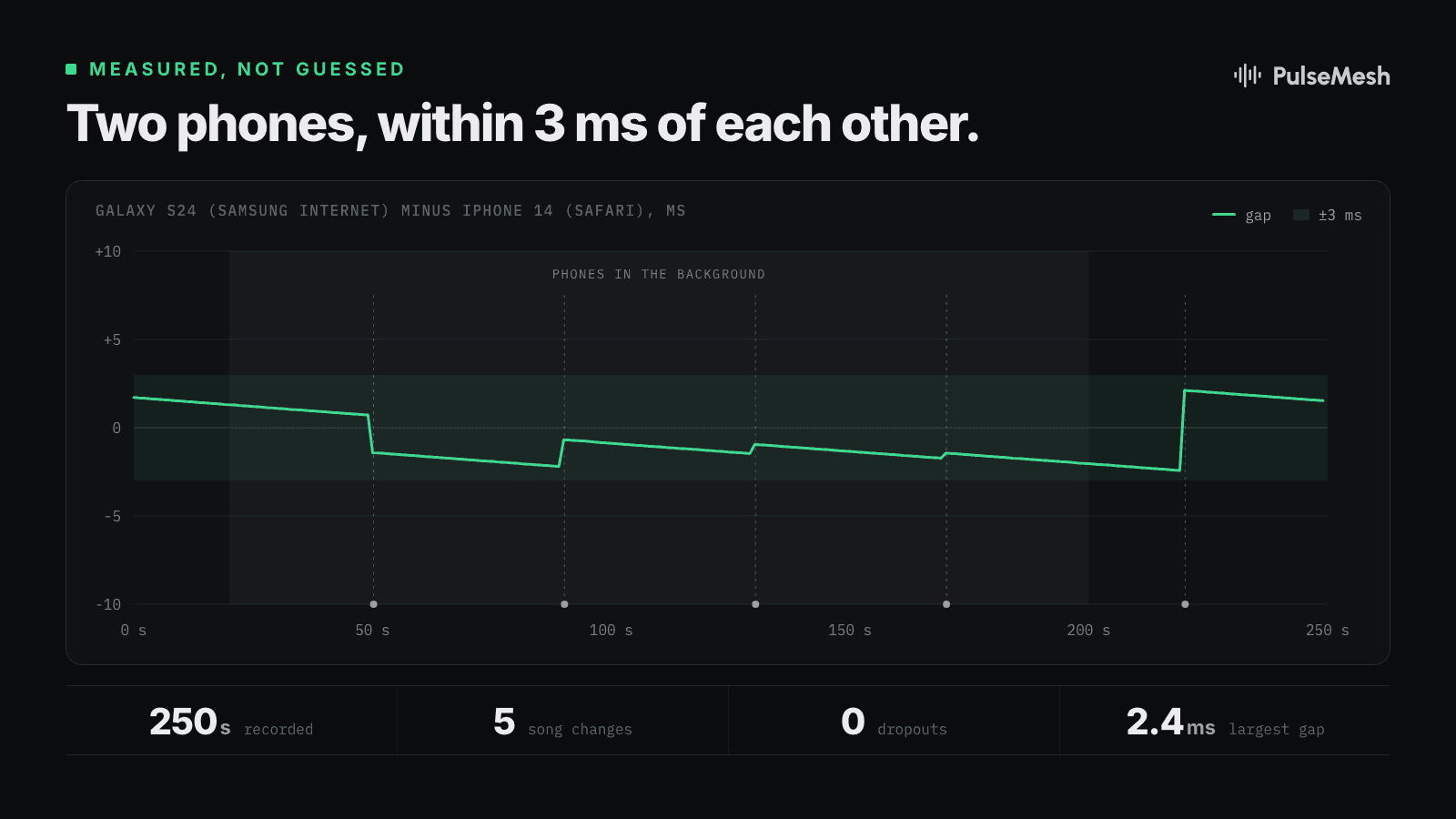
A typical run: a Galaxy S24 on Samsung Internet with the screen off, and an iPhone 14 on Safari switched to another app, both listening through five song changes. The largest gap between them across the whole recording was 2.4 milliseconds, with no dropouts.
We ran the same kind of test for every browser below, each with the phone locked for several minutes across at least four song changes.
Which browsers
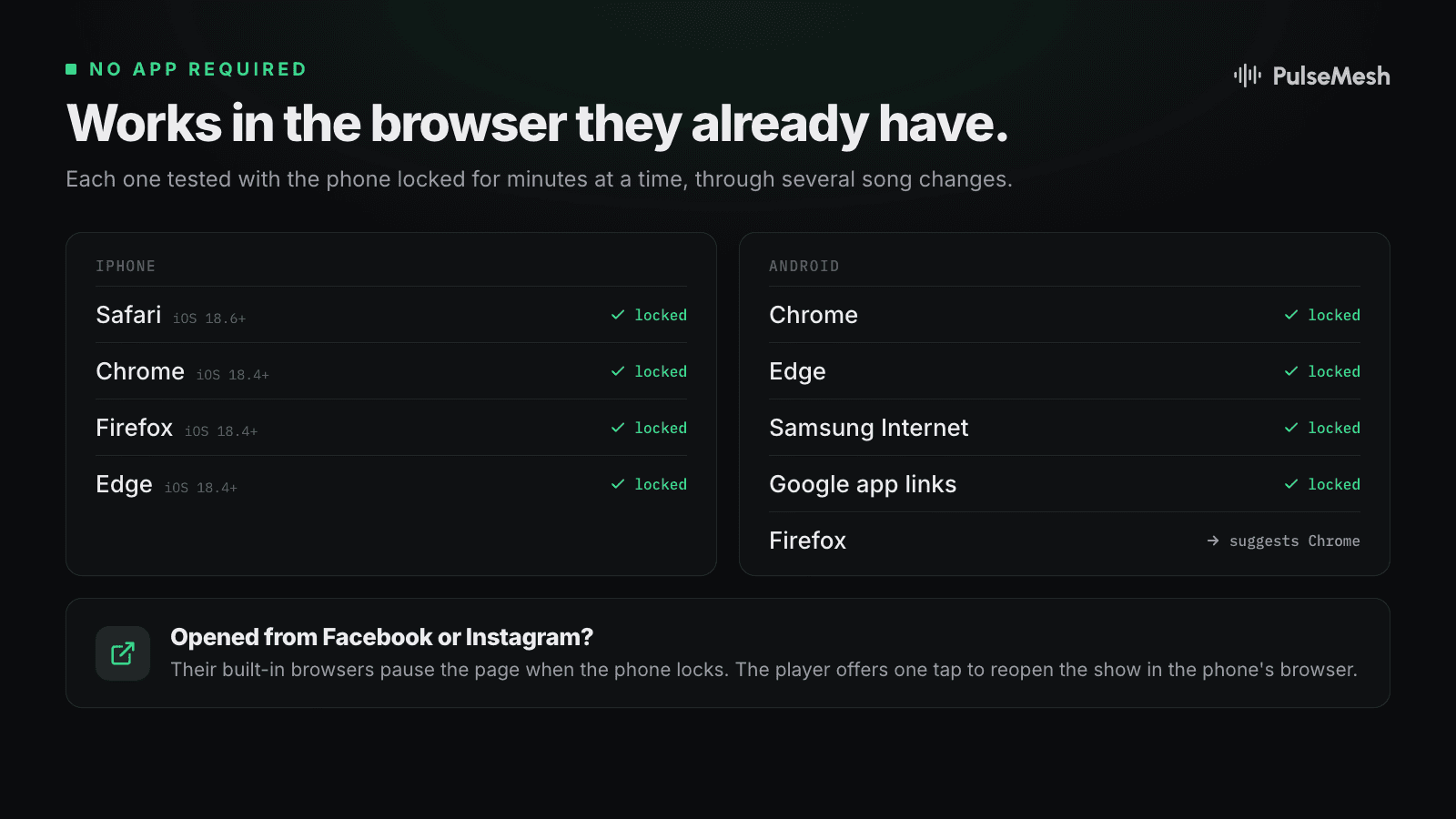
On iPhone, Safari, Chrome, Firefox and Edge all hold sync with the phone locked. On iPhone every browser runs on Safari's engine, so they share its improvements. That needs a reasonably current iOS: 18.6 or newer for Safari, and 18.4 or newer for the others. Older versions keep using the previous approach.
On Android, Chrome, Edge and Samsung Internet hold sync with the screen off. So do links opened from the Google app, which open in a Chrome tab.
Firefox on Android is the exception. It pauses web pages when the screen turns off, and no amount of cleverness on our side gets around that. Instead of letting a viewer find out halfway through a song, the player now explains this up front and offers a one-tap switch to Chrome. Viewers who prefer to stay in Firefox can.
Facebook, Instagram and other in-app browsers have the same problem: they stop the page when the phone locks. Lots of show links get shared in Facebook groups, so this matters. The player now spots these browsers and offers one tap to reopen the show in the phone's own browser, where it keeps playing.
A few more improvements
- Faster starts. The player now prepares the opening seconds of a song first and the rest while it plays, so a viewer who joins at the top of a song hears it sooner. iPhones on iOS 18.4 and newer also get Opus, the audio format Android already used.
- Long shows on iPhone. We found and fixed an issue where an iPhone could run low on memory over a long evening and reload the page. Each song now releases its memory when it finishes.
- A tidier lock screen. If a song file has no title or artist tags, the lock screen used to show "Unknown Title" and "Unknown Artist". It now shows your display's name and PulseMesh.
- Ready for iOS 27. iOS 27 has a bug that can make some audio take several seconds to prepare. The player works around it, and with Opus it isn't affected at all.
Car stereos, speakers and PerfectSync
Every Bluetooth speaker and car stereo adds a little delay after the phone plays a sound. Most of them tell the phone how much, and both the web player and the apps use that number to play early by exactly the right amount, so the sound leaves the speakers on the beat.
Some devices report that number wrong. For those, the PulseMesh app has PerfectSync: it plays a short chirp through the speaker, listens with the phone's microphone, measures the real delay, and calibrates to it. That's the one thing a web page can't do, and it's the reason to suggest the app to a viewer whose car or speaker sounds a little behind your lights.
What it means for your show
Nothing to change. The update is on the web player itself, so every viewer gets it the next time they open your show.
If you've been steering viewers toward the app for better sync, you don't need to anymore. Put the web link or your display's QR code front and center, and mention the app for anyone whose car audio sounds off.
For the technical folks
- Background Web Audio by default. iOS Safari 18.6+, iOS Chrome, Firefox and Edge on 18.4+, and Chrome, Edge and Samsung Internet on Android now keep the Web Audio engine in the background instead of swapping to an HTML5 audio element.
- Media anchor on Android. A silent media element keeps the browser's media session, and with it the foreground service that keeps audio and network alive, running for as long as the show plays.
- Clock watchdogs. On iPhone, the player checks that the AudioContext clock is really advancing and revives or rebuilds the context if iOS freezes it. On Android, it watches the output timestamp for sudden steps and corrects within about a second.
- Opus on iOS. Opus in Ogg on iOS 18.4+. On iOS 27, AAC decodes in the browser can take over 7 seconds for one song at 48 kHz. The player uses a 44.1 kHz audio context only for AAC sessions; Opus decodes in under half a second either way.
- In-app browser handoff. Detected by user agent. Android hands off to the default browser with an
intent:link, iPhone to Safari with anx-safari-https:link, and Firefox on Android offers an intent to Chrome.
If you want to see it for yourself, open your show on two phones, lock them both, and listen.